第二课:内容美化
1. 修改网站主页图标

网站的默认图片都存贮在这里:
\my-docs\static\img
修改docusaurus.config.js中的如下内容:
  themeConfig: {
    // Replace with your project's social card
    image: 'img/docusaurus-social-card.jpg',
    navbar: {
      title: 'My Site',
      logo: {
        alt: 'My Site Logo',
        src: 'img/logo.svg',
      },
改为
  themeConfig:
    /** @type {import('@docusaurus/preset-classic').ThemeConfig} */
    ({
      // Replace with your project's social card
      image: 'img/docusaurus-social-card.jpg',
      navbar: {
        title: "Heihe's Technical Blog",
        logo: {
          alt: 'My Site Logo',
          src: 'img/mylogo.svg',
        },
现在变为

2. 修改主页的文字信息

在docusaurus.config.js中修改如下内容:
const config: Config = {
  title: 'My Site',
  tagline: 'Dinosaurs are cool',
  favicon: 'img/favicon.ico',
3. 修改主页的点击按钮

在\src\pages\index.js最终修改如下内容:
function HomepageHeader() {
  const {siteConfig} = useDocusaurusContext();
  return (
    <header className={clsx('hero hero--primary', styles.heroBanner)}>
      <div className="container">
        <Heading as="h1" className="hero__title">
          {siteConfig.title}
        </Heading>
        <p className="hero__subtitle">{siteConfig.tagline}</p>
        <div className={styles.buttons}>
          <Link
            className="button button--secondary button--lg"
            to="/docs/intro">
            Docusaurus Tutorial - 5min ⏱️
          </Link>
        </div>
      </div>
    </header>
  );
}
4. 修改内容描述
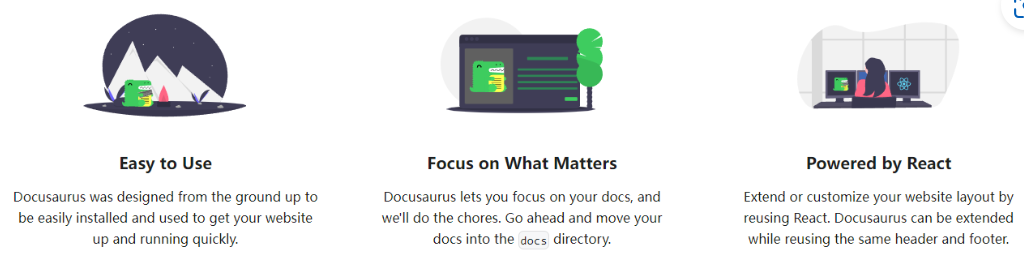
修改图标src/components/HomepageFeatures/index.js中如下内容:
const FeatureList: FeatureItem[] = [
{
title: 'Easy to Use',
Svg: require('@site/static/img/undraw_docusaurus_mountain.svg').default,
description: (
<>
Docusaurus was designed from the ground up to be easily installed and
used to get your website up and running quickly.
</>
),
},
{
title: 'Focus on What Matters',
Svg: require('@site/static/img/undraw_docusaurus_tree.svg').default,
description: (
<>
Docusaurus lets you focus on your docs, and we'll do the chores. Go
ahead and move your docs into the <code>docs</code> directory.
</>
),
},
{
title: 'Powered by React',
Svg: require('@site/static/img/undraw_docusaurus_react.svg').default,
description: (
<>
Extend or customize your website layout by reusing React. Docusaurus can
be extended while reusing the same header and footer.
</>
),
},
];
5. 修改主页边角信息

在docusaurus.config.js中修改如下内容:
footer: {
      style: 'dark',
      links: [
        {
          title: 'Docs',
          items: [
            {
              label: 'Tutorial',
              to: '/docs/intro',
            },
          ],
        },
        {
          title: 'Community',
          items: [
            {
              label: 'Stack Overflow',
              href: 'https://stackoverflow.com/questions/tagged/docusaurus',
            },
            {
              label: 'Discord',
              href: 'https://discordapp.com/invite/docusaurus',
            },
            {
              label: 'Twitter',
              href: 'https://twitter.com/docusaurus',
            },
          ],
        },
        {
          title: 'More',
          items: [
            {
              label: 'Blog',
              to: '/blog',
            },
            {
              label: 'GitHub',
              href: 'https://github.com/facebook/docusaurus',
            },
          ],
        },
      ],
      copyright: `Copyright © ${new Date().getFullYear()} My Project, Inc. Built with Docusaurus.`,
    },
6. 修改编辑此页的功能

修改docusaurus.config.ts的如下内容:
  presets: [
    [
      'classic',
      {
        docs: {
          sidebarPath: './sidebars.ts',
          // Please change this to your repo.
          // Remove this to remove the "edit this page" links.
          // editUrl:
          //   'https://github.com/facebook/docusaurus/tree/main/packages/create-docusaurus/templates/shared/',
        },
7. 侧边栏排序
在一个文档列表中,侧边栏默认按照 字符串逐字符比较的,因此排序可能会出现问题,比如 第十课 出现在 第一课 前面。这可以在文档中指定侧边栏位置解决
---
title: 第一课:开发环境配置
sidebar_position: 1
---
这样就设置了这个文档在侧边栏的最上方
8. 文本美化
(1) 使用 Markdown 语法
- 加粗(推荐):
**加粗文本**→ 加粗文本 - 斜体:
*斜体文本*→ 斜体文本 行内代码高亮:行内代码→行内代码
(2) 使用 <mark> 标签
这是 高亮文本 的示例。
这是 <mark>高亮文本</mark> 的示例。
(3) 使用内置警告和提示
Take care
这里是警告的内容
:::danger[Take care]

这里是警告的内容

:::
My tip
这里是提示的内容
:::tip[My tip]

这里是提示的内容

:::
9. 插入站内链接
[前往当前主目录](./intro)
./intro是 当前 md文件所在目录下的intro.md。
示例:前往当前主目录
[前往根目录](/docs/intro)
- 可以直接写
/docs/intro作为绝对路径,会前往./docs/intro
示例:前往根目录
如果想要链接定位到文档的 具体某个位置,在 Docusaurus 里,每个标题(如 ### 标题)都会自动生成一个 锚点(anchor),你可以这样链接:
[前往根目录的 "操作系统"](/docs/intro#二操作系统)
My tip
这里可以观察 URL ,尽管副标题是 ## (二)操作系统, 但是映射在 URL 中的地址是 /docs/intro#二操作系统
10. 代码块渲染优化
Docusaurus 对 Python 代码块的渲染美观性欠佳,比如图中的变量和函数都没渲染。
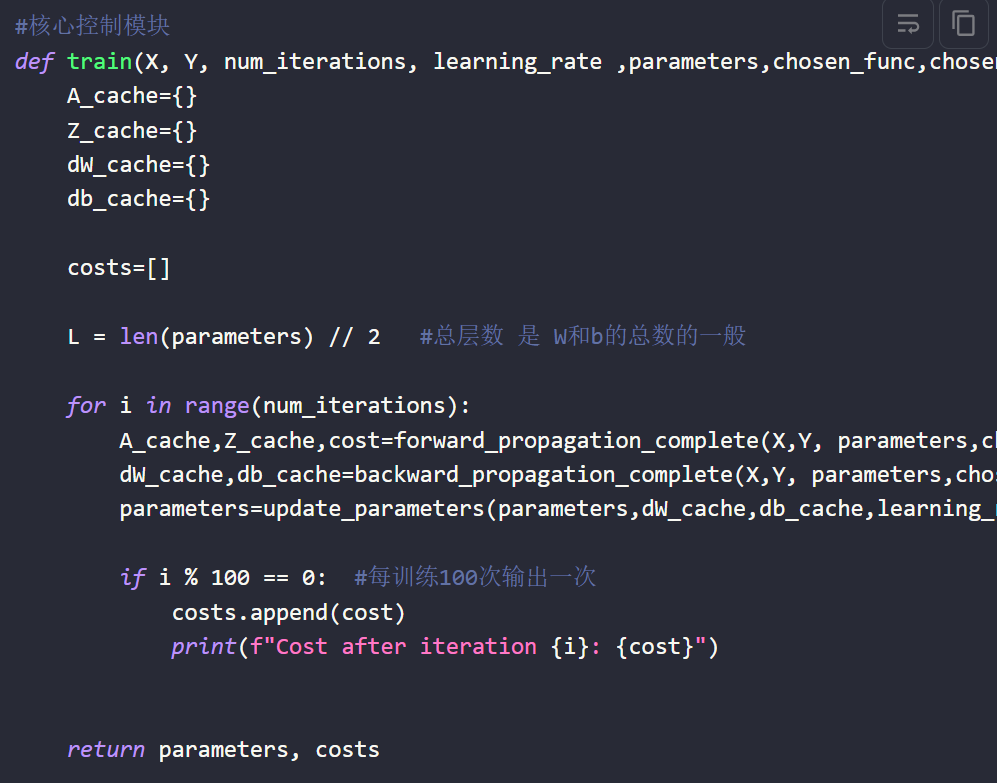
如果你希望 Docusaurus 里的代码块渲染效果和 VSCode 尽量一致(尤其是 Python),步骤如下:
1. 安装相关库
npm install rehype-highlight highlight.js
2. 修改 src/css/custom.css
你的项目里应该有这个文件:
D:\Notes\my-docs\src\css\custom.css
开头加上
@import 'highlight.js/styles/vs2015.css'; /* VSCode 风格 */
结尾追加:
/* --- 追加 VSCode Dark+ 风格 --- */

/* 代码块字体 */
code[class*="language-"], pre[class*="language-"] {
  font-family: 'Fira Code', 'Consolas', 'Courier New', monospace;
  font-size: 14px;
  line-height: 1.5;
}

/* 关键字 */
.token.keyword {
  color: #569CD6;
}

/* 函数名 */
.token.function {
  color: #DCDCAA;
}

/* 变量名 */
.token.variable {
  color: #9CDCFE;
}

/* 数字 */
.token.number {
  color: #B5CEA8;
}

/* 字符串 */
.token.string {
  color: #CE9178;
}

/* 注释 */
.token.comment {
  color: #6A9955;
  font-style: italic;
}

/* 运算符 */
.token.operator {
  color: #D4D4D4;
}

/* 类型 */
.token.class-name {
  color: #4EC9B0;
}

/* Python 专项优化 */
.token.builtin {
  color: #C586C0;
}
修改 docusaurus.config.js 确保 custom.css 被加载
看你之前配置里就有:
theme: {
  customCss: './src/css/custom.css',
},
如果是这样就不用改,直接用!
3. 修改 docusaurus.config.js
  presets: [
    [
      'classic',
      /** @type {import('@docusaurus/preset-classic').Options} */
      ({
        docs: {
          sidebarPath: './sidebars.js',
          remarkPlugins: [remarkMath],
          // rehypePlugins: [rehypeKatex],
          rehypePlugins: [require('rehype-katex'), require('rehype-highlight')],

          // Please change this to your repo.
          // Remove this to remove the "edit this page" links.
          // editUrl:
          //   'https://github.com/facebook/docusaurus/tree/main/packages/create-docusaurus/templates/shared/',
        },
        blog: {
          showReadingTime: true,
          feedOptions: {
            type: ['rss', 'atom'],
            xslt: true,
          },
          // Please change this to your repo.
          // Remove this to remove the "edit this page" links.
          // editUrl:
          //   'https://github.com/facebook/docusaurus/tree/main/packages/create-docusaurus/templates/shared/',
          // Useful options to enforce blogging best practices
          onInlineTags: 'warn',
          onInlineAuthors: 'warn',
          onUntruncatedBlogPosts: 'warn',
          rehypePlugins: [require('rehype-highlight')],
        },
        theme: {
          customCss: './src/css/custom.css',
        },
      }),
    ],
  ],